

Introduction
A few days ago, I shared the latest ChatGPT Team 48-month half-price promotions:
- “ChatGPT Team 0-dollar 48-month promo code: 2 seats for only $20”
- “ChatGPT Team 0-dollar 48-month promo code: 2 seats for only £11”
The most common feedback I received was that many people could not complete the payment. In most cases, this is caused by IP quality and payment risk-control checks.
At the moment, OpenAI’s default checkout page uses its own payment notification flow. However, the previous Stripe-hosted checkout channel still appears to be available. This is what many users call the “long checkout link.”
Because the two checkout channels may use different risk-control rules, you can try using the Stripe hosted checkout link if the default checkout fails.
Method 1: Manual Modification
Step 1: Open the promotional checkout link
First, open the link that contains the promotional code.
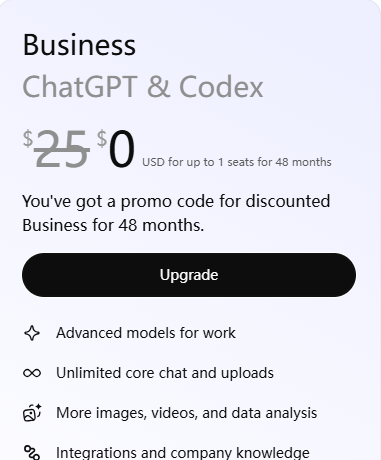
Before clicking Upgrade, press F12 to open the developer tools.
Step 2: Copy the fetch request
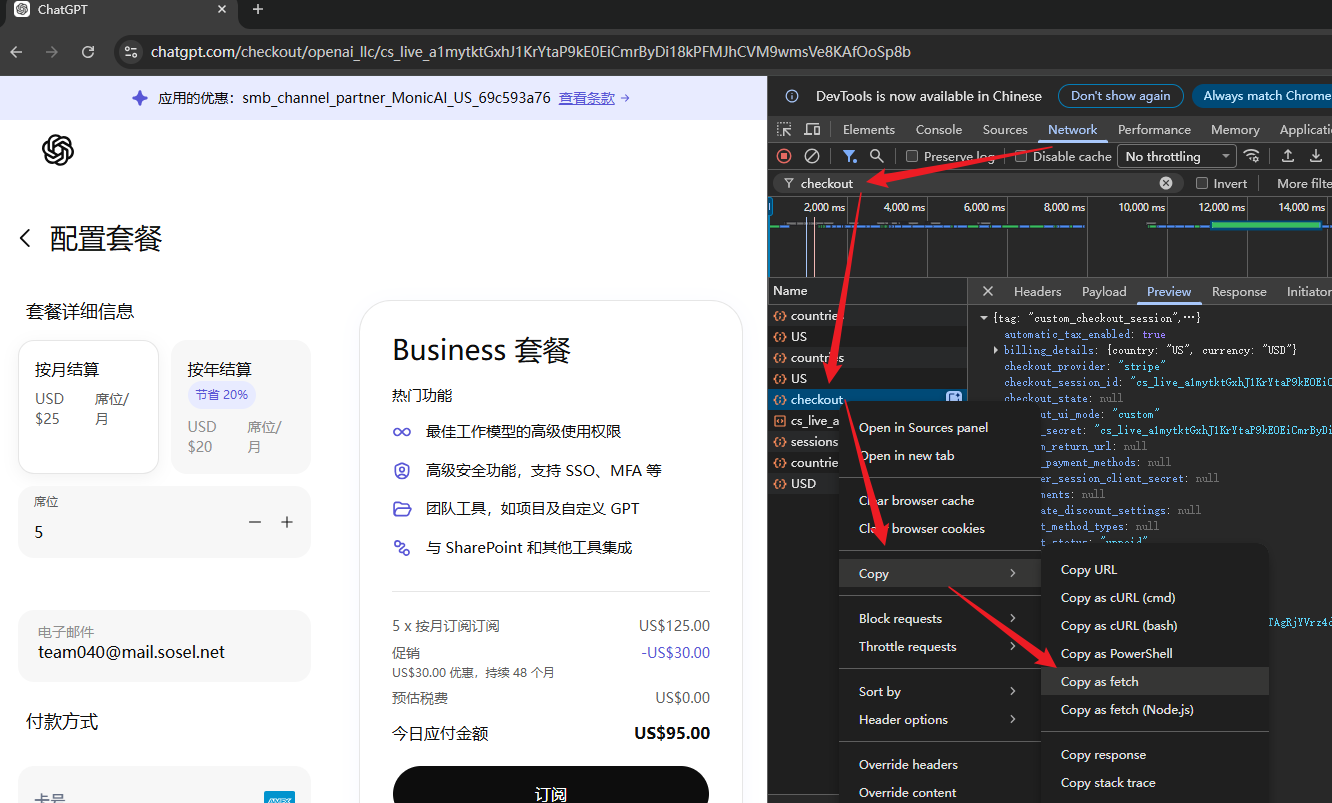
Follow the steps shown in the screenshot:
Network → Filter by “checkout” → Right-click the request → Copy → Copy as fetch
Step 3: Modify the fetch request
Go to the Console tab and paste the copied fetch code.
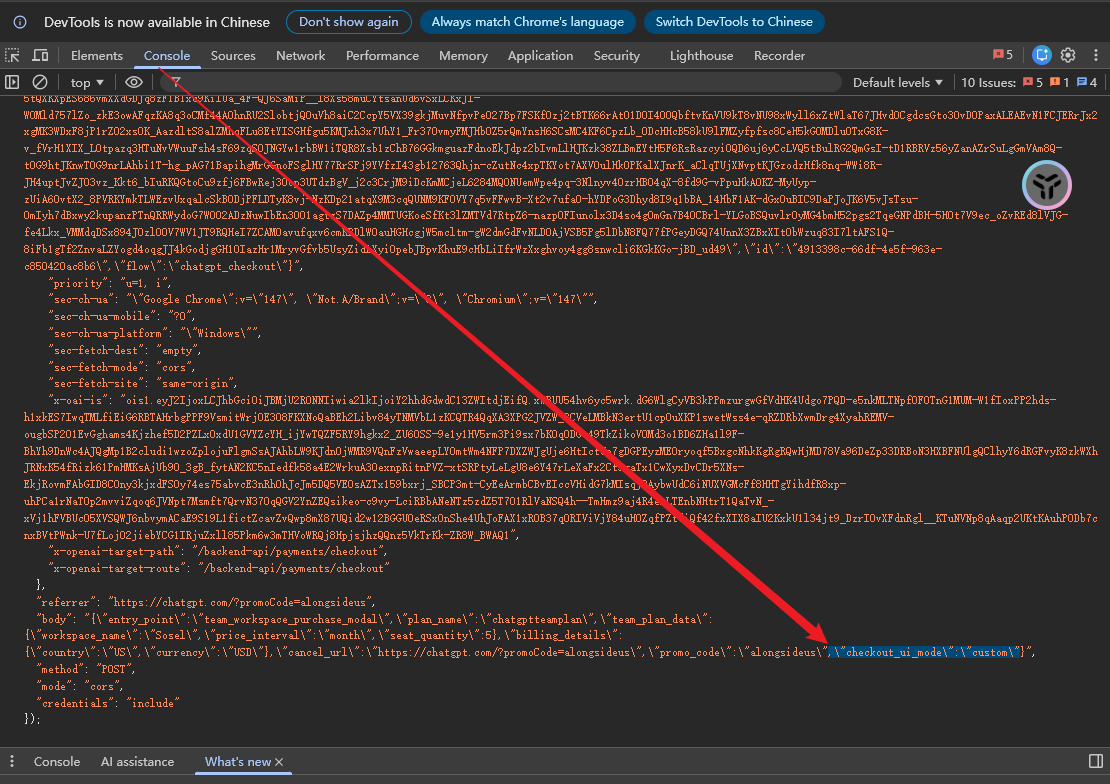
Then remove the UI template content after the promo code, as shown in the screenshot, and press Enter.
Step 4: Copy the new checkout URL
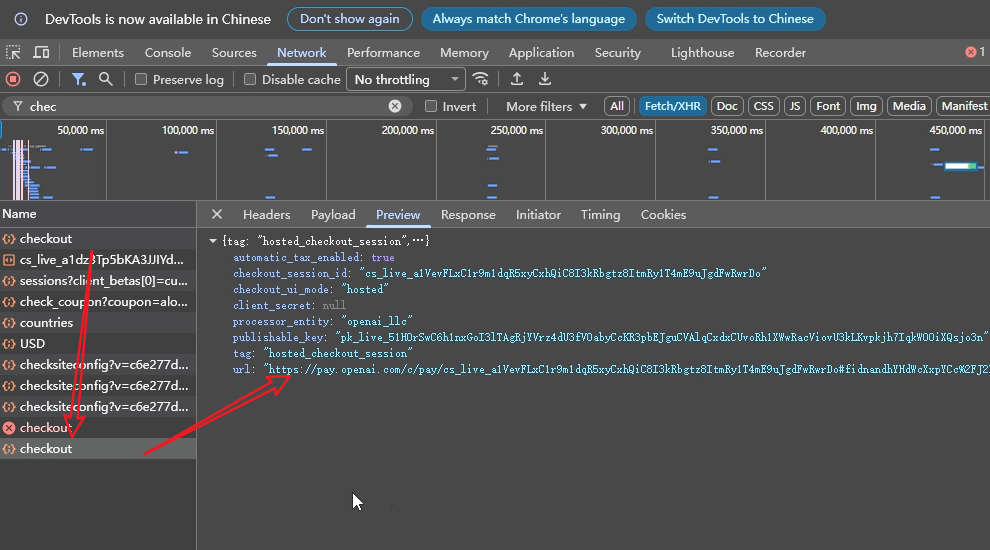
Go back to the filtered checkout request list from the previous step. Find the newly generated checkout request and open the Preview tab. You should be able to see the Stripe hosted checkout link there.
Method 2: Using a Script
Step 1: Same as above
Open the promotional checkout page and make sure you are logged in to ChatGPT.
Step 2: Paste the script into the Console
Copy the following code into the browser console:
(async function generateTeamHostedLink() {
  console.log("⏳ [team-link] Getting Session Token...");
// ── 1. Get the current logged-in Access Token ─────────────────────────────
let accessToken;
try {
const session = await fetch(“/api/auth/session”).then((r) => r.json());
accessToken = session?.accessToken;
if (!accessToken) throw new Error(“accessToken is empty”);
} catch (e) {
console.error(“❌ [team-link] Failed to get token. Please make sure you are logged in to ChatGPT:”, e.message);
return;
}
console.log(“✅ [team-link] Token retrieved successfully”);
// ── 2. Build the request payload ─────────────────────────────────────────
const payload = {
plan_name: “chatgptteamplan”,
team_plan_data: {
workspace_name: “MyTeam”, // You can change this to your preferred workspace name
price_interval: “month”, // Use “month” or “year”
seat_quantity: 2, // Minimum 2 seats; 2–5 seats are recommended
},
billing_details: {
country: “US”, // Must be US when using the THINKTECHNOLOGIES promo
currency: “USD”,
},
cancel_url: “https://chatgpt.com/#team-pricing”,
// Key point: use promo_code for the THINKTECHNOLOGIES promo
promo_code: “THINKTECHNOLOGIESUS”,
checkout_ui_mode: “hosted”,
};
// ── 3. Send the request ─────────────────────────────────────────────────
console.log(“⏳ [team-link] Requesting Stripe hosted checkout link…”);
let data;
try {
const response = await fetch(
“https://chatgpt.com/backend-api/payments/checkout”,
{
method: “POST”,
headers: {
Authorization: `Bearer ${accessToken}`,
“Content-Type”: “application/json”,
},
body: JSON.stringify(payload),
}
);
data = await response.json();
if (!response.ok) {
console.error(“❌ [team-link] Request failed. HTTP status:”, response.status);
console.error(data);
return;
}
} catch (e) {
console.error(“❌ [team-link] Network request error:”, e.message);
return;
}
// ── 4. Output the result ────────────────────────────────────────────────
const hostedUrl = data?.url || data?.stripe_hosted_url || data?.checkout_url;
if (!hostedUrl) {
console.warn(“⚠️ [team-link] No hosted checkout link was found. Raw response:”);
console.log(data);
return;
}
console.log(“─”.repeat(60));
console.log(“✅ [team-link] Successfully generated! THINKTECHNOLOGIES promo has been applied”);
console.log(“”);
console.log(“📋 Checkout Session ID :”, data.checkout_session_id);
console.log(“🏢 Plan : ChatGPT Team (THINKTECHNOLOGIES)”);
console.log(“👥 Seats :”, payload.team_plan_data.seat_quantity);
console.log(“”);
console.log(“🔗 Stripe hosted checkout link:”);
console.log(hostedUrl);
console.log(“─”.repeat(60));
console.log(“💡 Tip: After opening the link, make sure the discounted price is applied before paying.”);
})();
Change the promo code to a valid one, then press Enter.
Please remember to modify the promo code before running the script.
Step 3: Copy the new checkout link
The final step is the same as Step 4 in Method 1. You can find the newly generated checkout request in the Network tab and copy the Stripe hosted checkout link from the Preview section.
No repeated screenshot is needed here.
Summary
In short, you only need to slightly modify the UI template and manually submit the checkout request again. This will generate a new payment channel.
Alternatively, you can use the script method and replace the promo code with a valid one to achieve the same result.
Personally, I still think Method 1 is simpler because both methods require some manual editing anyway. However, please note that this method may stop working at any time.



暂无评论内容